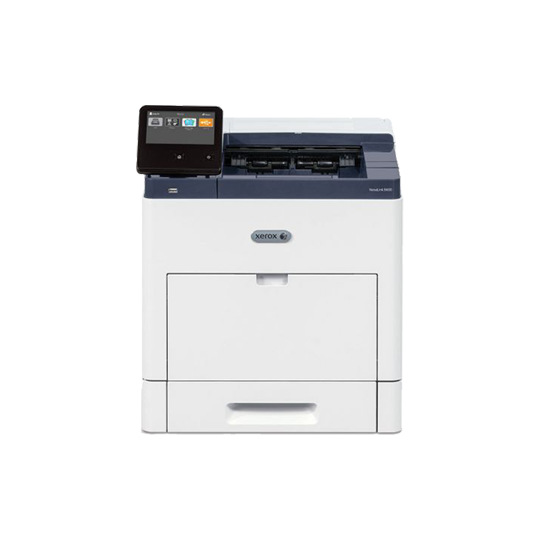
If your office needs professional color output without buying equipment outright, leasing the Xerox VersaLink C7000 color printer can be a practical and cost-effective move. The VersaLink C7000 is built for small to mid-size workgroups that need dependable color printing, fast output, and support for larger paper sizes. It can print up to 35 pages per minute in color and black and white, supports tabloid-size media, and offers standard two-sided printing. For teams that print presentations, marketing pieces, reports, proposals, invoices, and everyday office documents, this printer delivers strong performance without forcing your business into a large upfront purchase.
Why Lease Instead of Buy?
Leasing gives companies access to high-quality office technology while keeping cash flow more flexible. Instead of paying the full cost of a Xerox device upfront, your business can spread payments over time and often include service, support, supplies, or maintenance in the agreement. This is especially helpful for growing offices that want predictable monthly expenses and fewer surprise repair costs.
Leasing also makes it easier to upgrade when your needs change. If your print volume increases, your business expands, or you need newer security features later, a leasing program can provide a clearer path to updated equipment. For many offices, that flexibility is more valuable than owning a printer that may become outdated.
Reliable Color and Black and White Output
The VersaLink C7000 is designed for businesses that need both vibrant color and sharp black and white documents. Its strong print quality helps make sales sheets, flyers, handouts, and client-facing reports look polished and consistent. For companies that rely on brand colors and clean graphics, leasing a professional color printer can improve how printed materials represent the business.
At the same time, offices still need crisp everyday printing. Contracts, forms, shipping documents, spreadsheets, and internal reports often rely on clear black and white output. The Xerox VersaLink C7000 balances both needs, giving teams one dependable device for a wide range of print jobs.
Built for Larger Documents and Office Workflows
One reason many businesses consider the C7000 is its support for larger media, including tabloid-size paper. This gives offices more options for brochures, spreadsheets, signage, charts, newsletters, and design proofs. With a standard paper capacity of 620 sheets and available expansion options, the printer can support busier teams that do not want to reload paper constantly.
Connectivity is also important. The printer supports Ethernet, high-speed USB, and optional wireless features. Once installed on your network, your IT team can manage settings, drivers, and the device IP address so employees can print efficiently from approved computers and mobile devices. A stable setup helps reduce downtime and makes the printer easier to manage across departments.
Security Features for Modern Businesses
Printer security matters more than ever, especially in offices that handle contracts, employee records, invoices, customer data, or private business documents. The Xerox VersaLink C7000 includes security-focused features through Xerox ConnectKey technology. Depending on the configuration, offices can use tools such as user permissions, authentication, and secure print to help protect sensitive jobs.
Secure print is especially useful in shared office environments. Instead of sending a document directly to the output tray, a user can release the job at the printer. This helps prevent confidential pages from sitting unattended where others may see them. For law firms, finance departments, medical offices, schools, and executive teams, this added control can be a key leasing consideration.
Who Should Lease a VersaLink C7000?
Leasing this model makes sense for companies that need dependable color printing but do not want to purchase equipment outright. It is a strong fit for marketing departments, real estate offices, architecture firms, schools, nonprofits, financial teams, legal offices, and general business workgroups. If your staff prints a mix of color and black and white pages, needs tabloid output, and values professional print quality, the VersaLink C7000 is worth considering.
Before signing a lease, review your monthly print volume, color usage, service expectations, and network requirements. Ask whether maintenance, toner, parts, and remote support are included. Also confirm whether installation, driver setup, IP address configuration, and employee training are part of the agreement. The right lease should match your workflow, not just the printer model.
FAQ: Leasing the Xerox VersaLink C7000
Is the VersaLink C7000 good for color marketing materials?
Yes. The printer is built for high-color output and can support brochures, flyers, presentations, charts, and other business materials that require professional print quality.
Can it print black-and-white documents too?
Yes. The Xerox VersaLink C7000 handles both color and black-and-white printing, making it useful for offices that need a single device for everyday documents and polished customer-facing pieces.
Does the printer support secure print?
Yes. Secure print can help protect sensitive files by holding a job until the user releases it at the printer, which is helpful in shared workspaces.
Will leasing include setup and support?
Many lease agreements can include delivery, installation, service, supplies, and network setup. Always confirm whether IP address configuration, driver installation, and ongoing maintenance are included before signing.
Is leasing better than buying?
Leasing may be better if your business wants predictable monthly payments, included service options, and an easier path to upgrade later. Buying may make sense if you prefer long-term ownership and have the upfront budget.