Businesses depend on printers for a variety of documents, including reports, invoices, presentations, and customer materials. Dual tray printers streamline these tasks by keeping two paper types or sizes loaded and ready.
With increased paper capacity and fewer manual adjustments, dual-tray printers help offices boost productivity, streamline workflows, and minimize interruptions.
What Is a Dual Tray Printer?
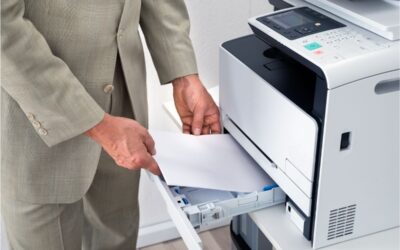
A dual tray printer features two separate paper trays, each capable of holding different paper sizes, types, colors, or quantities. Users can select the desired tray in the printer settings or let the device choose automatically based on the print job.
For example, one tray may hold letter-size paper while the other holds legal-size. Alternatively, one tray can be used for copy paper and the other for letterhead, colored paper, labels, or heavier media.
This flexibility enables employees to handle various printing tasks without constantly changing paper.
How Does a Dual Tray Printer Work?
Each tray is configured via the printer’s control panel or print driver, where users specify the paper size and media type. The printer then selects the appropriate tray based on the print job settings.
Many dual-tray printers support automatic tray switching. If one tray is empty, the printer uses the second tray if both contain compatible media. This is especially useful for large print jobs.
Some printers come with two trays as standard, while others offer an optional second tray for increased capacity.
Benefits of Using a Printer With Two Paper Trays
Dual tray printers offer several practical benefits for busy offices.
Reduce Paper-Loading Interruptions
Employees spend less time refilling or changing paper. Two loaded trays keep the printer available longer, especially during high-volume printing.
Support Multiple Paper Sizes
Businesses can keep letter-size paper in one tray and legal-size in another, allowing employees to print various formats without adjusting the paper supply for each job.
Separate Different Media Types
One tray can hold standard paper, while the other holds letterhead, colored paper, envelopes, or heavier stock. This simplifies the production of professional documents as needed.
Increase Total Paper Capacity
A second tray increases total paper capacity, which is valuable for offices that print large reports, invoices, contracts, or customer communications.
Improve Team Productivity
Centralized printers are often shared by multiple employees. Dual tray configurations help prevent delays by keeping the device ready for a wider range of print requests.
Who Should Consider a Dual Tray Printer?
Dual tray printers are ideal for organizations with diverse paper needs or moderate to high print volumes. They are commonly used in:
- Accounting and financial offices
- Healthcare facilities
- Legal practices
- Schools and administrative departments
- Real estate offices
- Retail and hospitality businesses
- Warehouses and distribution centers
- Corporate workgroups
For example, a legal office may frequently switch between letters and legal paper, while a healthcare facility may use plain paper for records and preprinted forms for patient documents. A dual tray printer simplifies both workflows.
Features to Consider When Choosing a Dual Tray Printer
Paper trays are just one factor in choosing the right office printer. Businesses should assess the entire device to ensure it meets long-term needs.
Important features to consider include:
- Paper capacity: Check each tray’s capacity and the printer’s maximum supported total.
- Print speed: Choose a speed that matches your team size and expected print volume.
- Media support: Ensure the printer supports the paper sizes, weights, and specialty media your office requires.
- Color or monochrome printing: Determine if your business needs color output or primarily print black-and-white documents.
- Multifunction capabilities: Consider if employees also need copying, scanning, or faxing.
- Duplex printing: Automatic two-sided printing reduces paper use and produces more professional documents.
- Security features: User authentication and secure print release can help protect sensitive information.
- Connectivity: Look for Ethernet, Wi-Fi, mobile printing, and cloud integration to suit your work environment.
Dual Tray Printer vs. Single Tray Printer
A single-tray printer may suffice for small offices with basic needs, but it can be inconvenient when employees frequently use different paper sizes or print large batches.
A dual tray printer offers greater flexibility and capacity. While it may require a higher initial investment, the added convenience can save time and improve workflow efficiency.
The best choice depends on print volume, paper needs, available space, and the number of users.
Find the Right Dual Tray Printer for Your Office
The right dual tray printer reduces interruptions, streamlines paper management, and helps employees complete print jobs efficiently. Businesses should compare print speed, capacity, media compatibility, and multifunction features before choosing a device.
BDS can help your organization assess its printing needs and select a dual tray printer that fits your workflow, budget, and document requirements. Contact BDS to explore available options and request a personalized quote.