A Practical Guide for Religious Institution Staff
Choosing the right printer is important for churches, mosques, and synagogues that produce bulletins, flyers, event programs, educational handouts, and administrative documents. A good fit can streamline work, reduce costs, and help staff and volunteers deliver both routine and time-sensitive materials. This guide outlines what to look for to select a practical, cost-effective solution for your community.
Because printed materials support worship, education, outreach, and day-to-day operations, reliability and ease of use matter as much as print quality. Newer devices add mobile printing, cloud storage for scanning, and basic security controls—useful when multiple staff members or volunteers share equipment. Start by estimating what you print, how often, and who needs access, then match those needs to the features below. Keep a short list of must-haves before comparing brands or lease options.
Key Features to Consider
Start with speed and responsiveness. If you regularly print large batches before services or events, look for a device in the 30–50 pages-per-minute range (or higher) and pay attention to warm-up time so the printer is ready quickly when you need it.
Reliability is just as critical. Choose a model known for low downtime and prioritize features such as maintenance alerts and supply notifications to avoid last-minute disruptions. Reviews from organizations with similar print volumes can be especially helpful.
Confirm the printer supports the paper sizes and media you use, letter, legal, larger poster formats, plus envelopes, labels, or card stock for invitations and mailers. If you produce graphics-heavy materials, select higher resolution and strong color performance (DPI) for crisp, readable output.
Match the device’s monthly duty cycle to your realistic volume so it can handle peak periods without excessive wear. Also consider paper tray capacity and output handling; larger trays mean fewer refills and smoother runs during busy weeks.
Multifunction Printers and Copier Lease
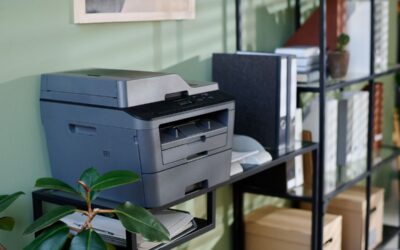
Multifunction printers (MFPs) combine printing, copying, scanning, and sometimes faxing—often the best value for institutions that handle varied tasks. Leasing an MFP or copier can reduce upfront cost and make it easier to upgrade as needs change.
Look for time-saving features such as an automatic document feeder, duplex scanning, and scan-to-email or scan-to-folder. If the device will be shared broadly, user sign-in and access controls can help protect sensitive records and discourage unnecessary printing.
Many leases bundle maintenance, supplies, and support, which can make costs more predictable. Review term length, including service levels, and any early-termination fees. If you work with a provider such as BDS, confirm exactly what’s covered (repairs, toner, parts, response times) so the agreement matches your usage.
Advanced Features and Managed Print Services
Features like automatic duplex printing, secure print release, and cloud connectivity can simplify day-to-day work. Managed print services (MPS) can further reduce waste and downtime by overseeing devices and supplies, letting staff stay focused on mission work.
Cloud and mobile printing allow staff and volunteers to print from laptops and phones and to send scans directly to shared storage. If you rely on remote collaboration, prioritize a simple, secure setup and consistent access across devices.
With MPS, a provider monitors usage, tracks supplies, and schedules maintenance proactively. The best programs also help you standardize settings, control costs, and place devices where they’ll be used most effectively.
Energy Efficiency and Consumption
Energy efficiency reduces operating costs and supports environmental stewardship. Consider ENERGY STAR certified models, and use settings like sleep/standby, auto shutoff, and draft/toner-saver modes where appropriate. If possible, choose vendors that offer cartridge and equipment recycling to reduce waste.
Budgeting and Total Cost of Ownership
Budget beyond the purchase price by estimating the total cost of ownership (TCO): toner/ink, paper, maintenance, repairs, and replacement. Compare cartridge yields and the availability of high-capacity options to understand true cost per page.
Maintenance contracts, extended warranties, or leases can reduce surprise expenses, but confirm what’s included and expected response times. Build a simple budget model based on monthly volume so printing remains reliable and predictable.
Printer Placement and Accessibility
Place printers where they support workflow, typically near administrative staff or shared work areas, to reduce delays and lost time. Larger sites may need more than one device. Prioritize accessibility (clear interfaces, reachable trays) and secure networking to protect sensitive documents. For frequent events, a portable or wheeled unit can add flexibility.
Training and Support
Train staff and volunteers on basic operation, troubleshooting, and any security features to reduce waste and service calls. Set clear procedures for requesting supplies, reporting issues, and approving larger print jobs, with one point of contact to coordinate support.
Case Studies: Printer Solutions in Action
Institutions often achieve quick gains by consolidating older desktop printers into a single, reliable multifunction device with scanning and shared folders, reducing supply costs and simplifying record-keeping. Others use short or predictable lease arrangements for peak seasons and major events, pairing higher speed with included service and support.
Conclusion: Making the Best Choice
To choose the best printer for your institution, estimate your typical and peak print volume, then prioritize speed, reliability, paper/media handling, security, and cost of ownership. Consider whether an MFP, lease, or managed print service fits your staffing, space, and budget. With proper planning and basic training for staff and volunteers, you can deliver consistent, high-quality materials for worship, education, outreach, and administration week after week.